
Imagine opening your radionics workspace, choosing a clear intention, loading the appropriate filters, and beginning your operation without first purchasing an expensive machine. No separate generator to find room for. No additional instrument to carry whenever you want to practice. Your working arrangement is available on your computer, ready to organize, save, and use again.
That is the practical change the Chi transfer card brings to Quantum Radionics Fire Toolz.
The first point deserves a direct answer: you do not need a physical orgone generator or a radionics machine with an integrated orgone generator to use Quantum Radionics Fire Toolz as designed. The included transfer card fulfills the energy-source role within its radionic method. Understanding that role is essential, because the card is much more than an attractive image added to a template.
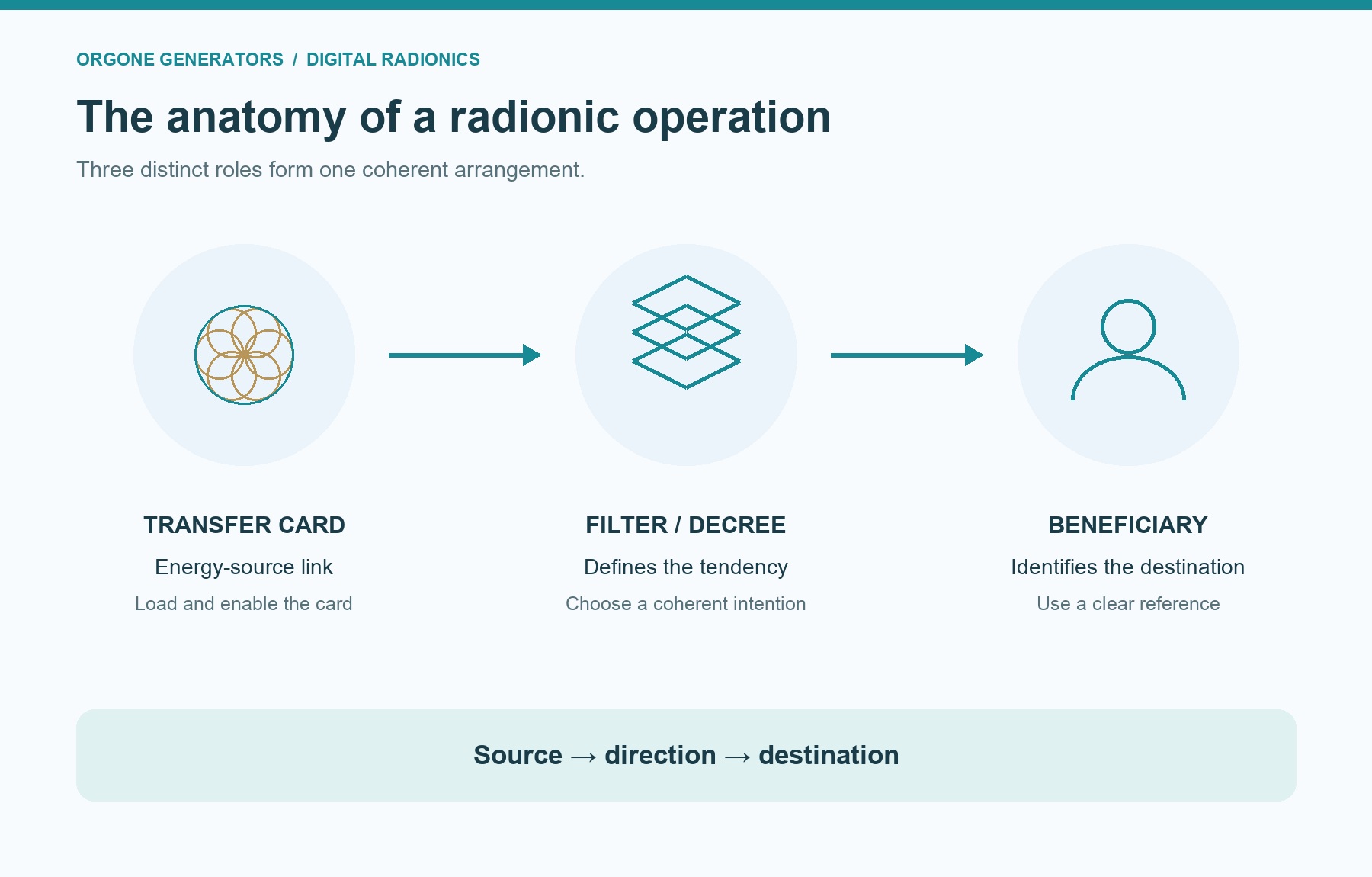
It helps to separate three things from the beginning: the source, the intention, and the destination. The transfer card provides the energetic foundation in the practice. The filters shape the intention. The beneficiary identifies where the operation is directed. Once you understand those three roles, the entire arrangement becomes easier to build and use thoughtfully.
What is a Chi transfer card?
A Chi transfer card is a specially designed graphic used as the energetic source link in a radionic operation. You may also encounter the names Chi/Orgone card, orgone energy transfer card, or simply transfer card. Here, these names refer to the same basic role: supplying the operation with its energetic foundation through the card’s structural link.
Chi, prana, and orgone are terms used in different traditions and systems when discussing life force. They have distinct histories, but in this working vocabulary they point toward the vital-energy aspect of the practice. The card gives that aspect a defined place in the operation instead of leaving it as an unspoken assumption.
Think of a well-organized workshop. You need something that supports the work, something that determines what you are making, and a clear destination for the finished effort. Those responsibilities belong to different parts of the arrangement. Confusing them creates unnecessary difficulty, even when every individual component looks impressive.
The transfer card is the foundation. A filter for concentration, harmony, or creativity introduces a particular tendency. A photograph or other suitable representation identifies the beneficiary. A complete operation brings these roles together deliberately.
I recommend learning this distinction before collecting large numbers of cards. A modest operation you understand is a stronger starting point for disciplined practice than a crowded arrangement whose parts you cannot explain.
The three parts of a clear operation
The easiest way to understand the working relationship is:
Transfer card → filter or decree → beneficiary.
The transfer card answers the question, “What provides the energy-source connection for this operation?” Its purpose remains foundational whether your intention concerns creative work, personal harmony, or another appropriate area of practice.
The filter answers, “What quality or direction am I introducing?” A radionic filter may be a prepared card, a suitable image, or a written decree used in a supported field. Its role is to give the operation a specific tendency. A transfer card and a concentration filter are therefore not interchangeable simply because both are images.
The beneficiary answers, “Who or what is this operation for?” For personal work, that may be your photograph and identifying information. For work concerning your own space, it may be a clear image of that space. The important point is that the reference identifies the intended focus without confusion.
Consider a hypothetical operation for greater concentration during a creative project. Your own photograph identifies the beneficiary. A concentration filter defines the main tendency. A concise decree connects the intention to the work you intend to do. The transfer card supplies the source role in that arrangement.
Each part has a job. None automatically repairs mistakes in the others. An active transfer card does not clarify a vague intention, and a beautifully written decree does not correct the wrong beneficiary photograph.
How the card works in radionic practice
The central concept is the structural link. In radionics, a structural link connects a representation with what it stands for in the operation. A beneficiary’s photograph serves as a link to that beneficiary. The transfer card serves as a link to the energetic source associated with its design.
This is why the image matters as more than decoration. It has a particular function in the method. You are selecting a working component with a defined purpose, not choosing whatever happens to match the colors of your screen.
The Fire Toolz transfer-card teaching brings together sacred geometry, the pyramid connection, and the idea of a universal source of creation. The pyramid geometry provides one part of that structure. The Flower of Life expresses the interconnected order of creation within the sacred-geometric framework. Their relationship explains why geometry belongs at the foundation of the card’s design.
The larger perspective is holographic: the whole and its parts are understood as deeply related, and a meaningful representation participates in that relationship. This gives the structural link its place in the practice. The source connection, the tendency introduced by the filters, and the beneficiary’s representation form a coherent working arrangement.
That is a metaphysical explanation of the method. It should not be confused with an independently established physical mechanism or a measured energy output. The word “quantum” does not turn a photograph or geometric drawing into scientific proof of remote energy transmission.
Understanding that distinction lets us discuss the craft clearly while keeping its actual software functions and its energetic theory in their proper places.
Sacred geometry with a purpose
Sacred geometry can attract attention because it is beautiful. Repeating circles, balanced proportions, and pyramid forms create an immediate impression of order. Yet in this practice, appearance is only the beginning. The geometry belongs to the card’s intended relationship with its source.
The pyramid connection and the Flower of Life are therefore meaningful components of the teaching, rather than interchangeable ornaments. Their presence expresses the organization of the energetic link. When working with the included card, preserve its intended identity and use it for the purpose it was supplied to fulfill.
A common beginner’s mistake is assuming that every geometric design performs the same function. A decorative mandala, an intention filter, and a transfer card may all contain circles and symmetry. That does not make their roles identical. The question is always what a particular image is meant to do in the operation.
For the same reason, an illustration accompanying an article is not automatically a usable transfer card. Use the actual supplied card or a compatible card whose purpose you understand. Beautiful artwork can help explain a concept without replacing the working resource.
This habit keeps your practice organized. You know which image provides the source role, which images define tendencies, and which reference identifies the beneficiary. Beauty can support attention, but clarity gives the arrangement its structure.

Why the transfer card is essential
An operation needs more than an intention and a destination. In the Fire Toolz method, it also needs the Chi/Orgone source role. That is why the transfer card belongs in the basic setup rather than being treated as an optional finishing touch.
Without that distinction, you might load a photograph, add several filters, and assume that everything necessary is already present. The screen may look complete, yet the transfer-card component can still be missing or disabled. Visual fullness and a correctly configured operation are different things.
I recommend making the card part of your opening check every time. Confirm that you have selected the intended card, loaded its actual image, and enabled it where the application requires activation. Then review the filters and beneficiary before beginning.
The same principle matters when you move between my radionics programs: identify how the particular application implements its energy-source role. Where a program uses a Chi transfer card, make that card part of every operation that calls for it. If the application provides an integrated arrangement, understand that arrangement before adding duplicate components.
Do not assume that every program has the same card manager, the same controls, or the same template format. The transferable lesson is the role of the card. The exact way you load and activate it belongs to the individual application.
A consistent source check is a practical discipline that travels with you, even when the interface changes.
No separate physical orgone generator is required
Traditional radionics arrangements can involve a physical instrument, an orgone generator, or a machine that combines several functions in one enclosure. For someone new to the field, that can create the impression that purchasing hardware is the unavoidable first step.
Quantum Radionics Fire Toolz removes that requirement from its own method. The included Chi/Orgone transfer card takes the source role that would otherwise be assigned to a separate generator in a hardware-based arrangement. You can build and run the intended software operation without connecting such a machine.
Notice what this means in practical terms. You can concentrate on understanding your intention, selecting suitable filters, identifying the beneficiary, and organizing the session. Your first challenge becomes learning the method rather than assembling an expensive collection of instruments.
The computer still needs to run the software properly. Your card image must be available, your configuration must be complete, and the operation must actually be started. Removing a separate generator from the setup does not remove ordinary software requirements.
It also does not promise a particular external result. The absence of a hardware requirement is a clear feature of the method; a guaranteed manifestation is a different claim. You do not need to blur those ideas to appreciate the freedom of a simpler working arrangement.
For many practitioners, that freedom is the decisive change: a dedicated physical radionics machine no longer has to stand between curiosity and practice.
Where the financial savings come from
The financial advantage is straightforward: equipment you do not need to purchase is an expense you can avoid. If you were considering a physical radionics instrument or an additional orgone generator, a method that does not require that purchase changes your starting budget.
The amount depends on the equipment you would otherwise buy. As a simple illustration, avoiding a planned $500 machine purchase avoids that $500 hardware expense. Avoiding a planned $2,000 setup avoids that $2,000 hardware expense. These are hypothetical examples, not current quotations for particular machines or promises of what every reader will save.
That is the sensible meaning of saving hundreds or even thousands of dollars: the potential avoidance of a separate equipment purchase. Your actual comparison should account for the software, any computer you need, and any optional resources you choose. If you already own everything, your immediate financial calculation will naturally be different.
There is also a practical advantage in needing fewer dedicated objects. You have less equipment to accommodate in your working space and fewer separate pieces to transport. Your saved configurations become part of an organized digital library instead of requiring you to reconstruct every arrangement from memory.
The useful question is not how much equipment you can accumulate. It is what you genuinely need to carry out the method you have chosen. For Fire Toolz, a separate physical generator is not on that required list.
Radionics in the technological era
We already use software to organize activities that once demanded shelves of materials and specialized workstations. A digital workflow makes it possible to store complex arrangements, retrieve them quickly, and adapt them without rebuilding everything from the beginning.
Radionics can benefit from that same change. Fire Toolz brings the beneficiary, filters, decrees, transfer-card resources, and reusable configurations into a software workspace. The method becomes easier to organize as a continuing practice rather than a series of arrangements you must recreate by hand.
This is the useful sense in which dedicated hardware belongs to an older technological approach. Its physical form no longer needs to define what your radionics workspace must look like. For this method, the separate box is optional rather than the gateway to participation.
That does not require dismissing everyone who enjoys physical instruments. Some practitioners value their tactile routines and established habits. The important development is choice: a newcomer need not assume that a larger instrument or a higher equipment bill is the necessary path to serious practice.
A modern workspace can be compact, repeatable, and adaptable. You can preserve a useful arrangement, return to it, check its details, and refine it with intention. The transfer card is central to that shift because it makes the source role available within the digital method itself.
Technology earns its place when it helps you practice with greater clarity and less unnecessary friction.
What “better results” should mean
A useful conversation about improvement starts with things you can actually identify. Did you remember the transfer card? Did you load the correct beneficiary? Can you reopen the intended configuration? Are the filters coherent? Can you tell one operation from another without guessing?
Software can improve these aspects of your work by giving the arrangement a visible, reusable form. Saving a template reduces the need to rebuild it. Clear filenames help prevent selecting the wrong reference. Reviewing the card’s enabled state helps catch a simple omission before the session begins.
These improvements matter. A method becomes easier to practice consistently when its setup is easier to check. You spend less effort remembering what you did and more attention deciding whether the operation is well constructed.
Greater energetic amplification through the card and the digital movement of the operation is part of the radionic teaching. It is not a measured demonstration that software universally produces stronger effects than every physical machine. I would not turn a claim of superiority into a substitute for careful practice and honest observation.
Instead, aim for better work: clearer intentions, coherent filters, accurate references, and useful records. Those are meaningful improvements you can pursue immediately. Let your observations remain specific, without assuming that every favorable event proves causation or that every difficulty means the card has failed.
Setting up the card in Fire Toolz
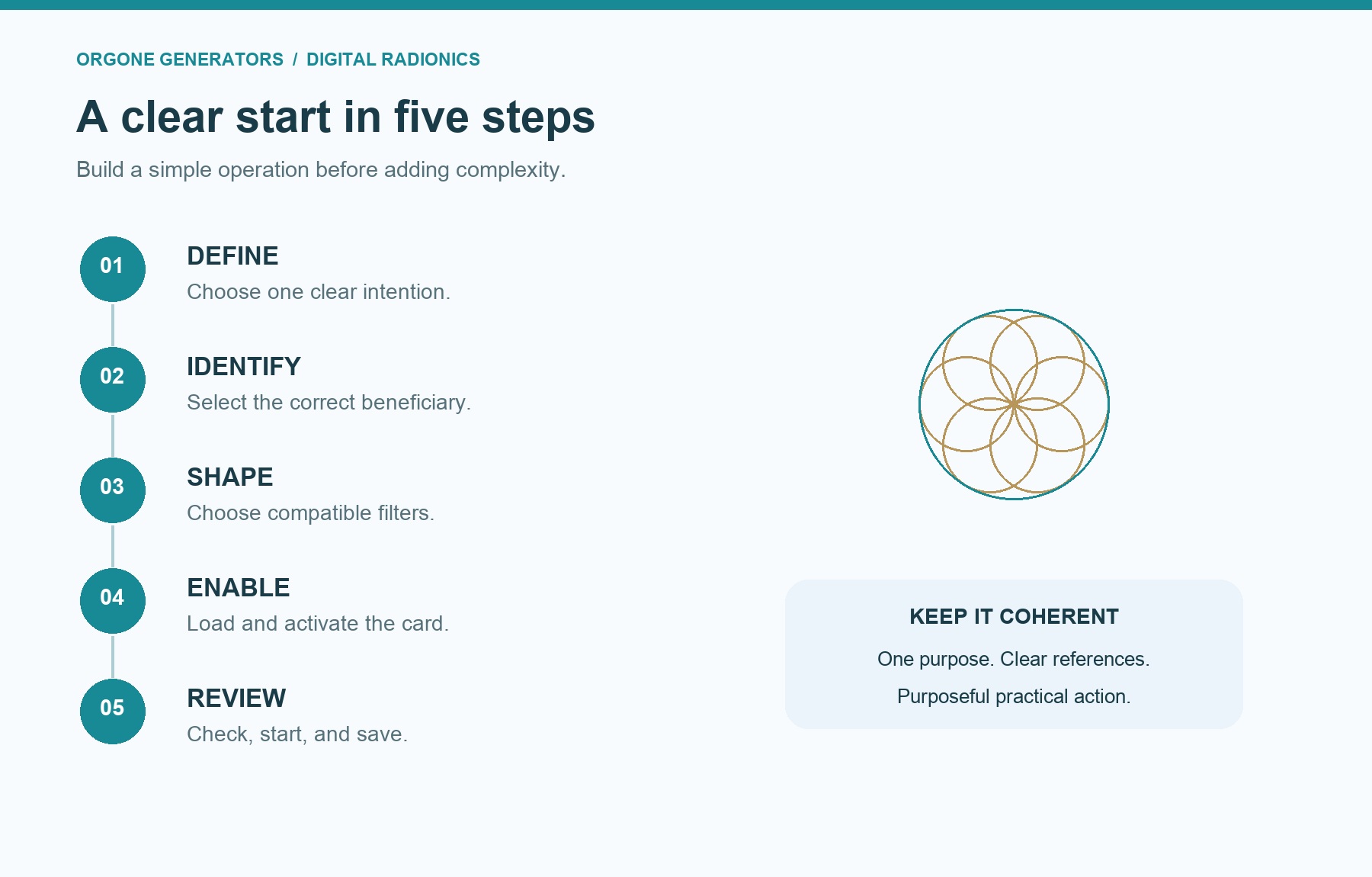
Begin by choosing a simple operation you understand. Prepare the beneficiary reference and the filters you intend to use. Keep the actual transfer-card file somewhere easy to identify so you do not accidentally choose a decorative graphic or an unrelated card.
Open the transfer-card management area in your version of Fire Toolz. Create a card entry, associate the correct image with that entry, and enable it. These are separate actions: creating a record, loading its image, and making it active.
Look at the preview before leaving the manager. The preview should show the intended card. Then check its enabled state. An image can be present in the manager while its entry remains inactive, so the preview alone is not the complete check.
When using more than one card, complete and review each entry individually. Loading another image into the same entry can replace the first image rather than create a second card. Keep names clear enough that you can distinguish the entries without relying entirely on small thumbnails.
Return to the operation and inspect the beneficiary and filters together. Start the operation using the appropriate control for your version. The display’s movement confirms that the software is running its visual sequence; it is not an instrument reading of Chi output.
Save the configuration with a descriptive name, and verify the card setup when you reopen it. A saved arrangement deserves the same brief review as a newly created one.
A simple example: concentration for creative work
Suppose you want to support a regular writing practice. This is a hypothetical example, and it begins with a specific intention: focused attention while working on your own writing project.
Use your own clear photograph as the beneficiary reference. Choose a concentration filter that suits the operation. If you add another tendency, make sure it supports the same goal, such as creative expression. Avoid filling every available space simply because the program gives you room.
A suitable decree might be: “I bring clear attention and steady creative effort to my writing.” This states the direction of your own work without trying to dictate another person’s behavior or promise an extraordinary outcome.
Load and enable the Chi transfer card through the application’s card-management function. Review the complete arrangement: source role, intention, and beneficiary. Then begin the session using the settings appropriate to the operation you are practicing.
Give the intention a practical expression as well. Open the writing project, put distractions aside, and work on a defined task. The session and your real activity should point in the same direction.
Afterward, note something concrete: whether you started on time, what you completed, and what interfered with concentration. This keeps your observations useful. It also helps you refine the next session without turning every ordinary fluctuation in attention into an elaborate energetic explanation.

From a physical arrangement to a digital one
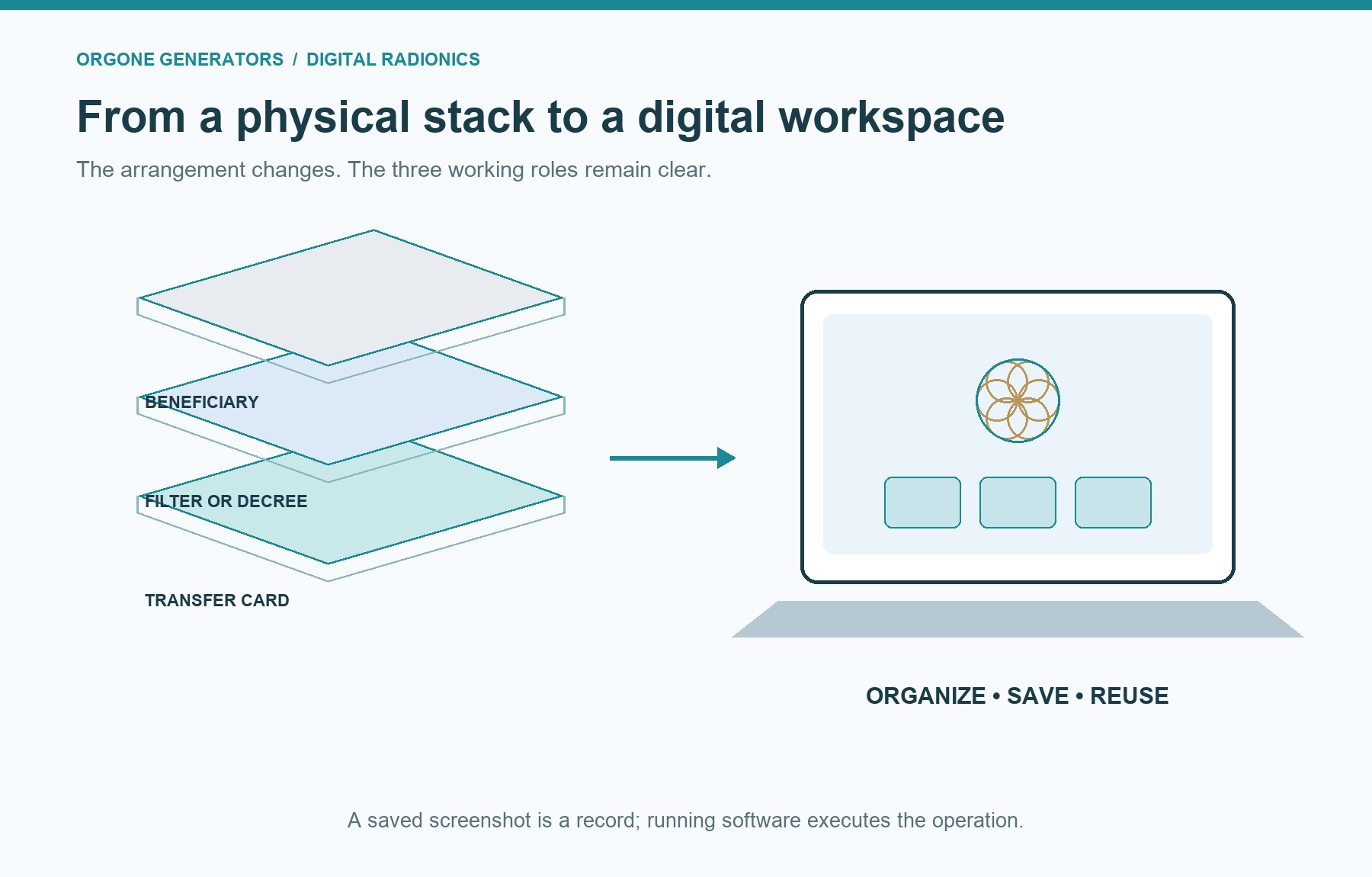
The physical arrangement offers a helpful picture of the same three roles. In the basic stacked method, the transfer card sits at the bottom, the filter or decree sits above it, and the beneficiary’s photograph sits at the top.
The order expresses the working relationship: source, tendency, destination. Looking at that simple stack can make a digital operation easier to understand, especially if a screen contains several boxes and moving elements.
Fire Toolz organizes these components digitally and presents the transfer process through its operating sequence. The software gives you ways to use images, arrange filters, preserve configurations, and return to an operation without rebuilding the physical stack each time.
The digital method is more than taking a photograph of a paper arrangement. The program must be running to execute its software functions. A screenshot preserves a view of the configuration, but it does not preserve an active software process. Likewise, an animated image opened elsewhere is not automatically a running Fire Toolz operation.
This distinction is useful when saving your work. Keep the appropriate template or configuration, along with the image resources it needs. A screenshot can help you remember the layout, but it should not be your only record of a setup you intend to reuse.
The old arrangement teaches the logic; the digital workspace makes that logic easier to organize.
One card first, then purposeful complexity
It is tempting to assume that more cards always mean a better operation. More filters, more transfer cards, more movement, and more simultaneous sessions can all appear to promise greater power. Yet complexity also makes a setup harder to understand and review.
I recommend becoming comfortable with one correctly loaded and enabled transfer card first. Learn to distinguish its role from the filters. Practice identifying the beneficiary clearly. Save an arrangement and reopen it, checking that the components you expect are actually present.
Additional cards should have a reason to be there. Use the capacity supported by your program and the configuration you are following. Do not import a limit from another application or assume that every available position needs its own card.
The same restraint applies to filters. Concentration and creative expression can contribute to one coherent purpose. Unrelated intentions are often easier to manage as separate operations. A crowded template is not automatically a more precise one.
Your computer also has practical limits. Many animations, large images, or several simultaneous operations can affect performance. If movement slows or files fail to display, investigate the ordinary technical cause first. A responsive, understandable arrangement is a better working environment than one so overloaded that you cannot tell what is happening.
Build complexity only after clarity is secure.
Common mistakes worth avoiding
The most frequent conceptual mistake is treating the transfer card as another intention filter. Keep the question simple: does this component provide the source link, define the tendency, or identify the beneficiary? Knowing the answer prevents many configuration errors.
Another mistake is confusing “loaded” with “enabled.” Always check both. If you create several entries, inspect them individually so that a familiar thumbnail does not conceal a disabled card or an accidental replacement.
A third mistake is using an unclear reference. If a photograph contains several people or several unrelated spaces, make sure the intended beneficiary is unambiguous. Use a suitable, clearly identified reference and respect the privacy of anyone whose image is involved.
Do not improvise technical settings because a number sounds spiritually meaningful. A value belongs in a particular control for a particular reason. Understanding that reason matters more than repeating a number without knowing what it changes.
Finally, avoid constant changes made out of impatience. If you alter the card, filters, decree, and session arrangement together, it becomes difficult to learn anything useful from your observations. Keep a simple record, refine deliberately, and allow your practical actions to remain part of the process.
Careful preparation is a skill. It makes every later step easier to understand.
Bringing the principle into other radionics programs
When changing programs, start with the operation’s structure rather than its appearance. A different interface may arrange the beneficiary, intention, and source controls in unfamiliar places, but those roles still provide a useful way to understand what you are preparing.
Ask three practical questions as you inspect the workspace. Where is the beneficiary identified? Where are the tendencies or decrees configured? Where does this application provide or accept its transfer-card component? Answering these questions is more reliable than trying to recreate the screen layout of another program.
Use the card resources intended for that application and check whether activation is automatic or requires your action. Do not assume that importing an image into an ordinary filter position gives it the same function as loading it through a dedicated card manager. The correct location matters because the application determines how each component participates in the operation.
Similarly, avoid assuming that a saved Fire Toolz template will open in another radionics program. Image resources, templates, and application settings are different kinds of files. A compatible image does not establish compatibility for an entire session.
The aim is continuity of understanding. You should be able to explain your operation in plain language even when the buttons look different. That makes the transfer-card principle useful across your practice without creating confusion about what a particular piece of software actually supports.
Before saving, give the operation a name that describes its purpose rather than its hoped-for power. A label such as “Writing concentration” is easier to recognize later than an extravagant title. Keep related images together, preserve the original card file, and review the beneficiary whenever you reuse a template. These ordinary organizational habits support a workspace you can understand at a glance, even after time away from your practice.
A modern practice with a clear foundation
The Chi transfer card changes the starting point for digital radionics. You no longer have to treat an expensive physical machine as the admission price for the Fire Toolz method. The source role is built into the practice through the included card, alongside the filters and beneficiary that complete the arrangement.
That opens room for a more accessible workspace: fewer dedicated objects, reusable configurations, and a clearer way to organize your intentions. The potential savings come from equipment you can avoid purchasing. The practical improvements come from learning to use the software carefully and consistently.
Keep the foundation simple. Understand your card. Define one coherent intention. Identify the beneficiary accurately. Confirm that the required components are active. Then connect your practice with purposeful action and honest observation.
For your next session, begin with one clear intention and review those three roles: transfer card, filter, and beneficiary. That small discipline is an excellent way to bring both meaning and clarity into your digital radionics practice.